IGN: rayytg
Ban Date: 08-11-2026
Reason: Bypassing/Hacking
I am rayytg, and I got banned on 08-11-2026 for "bypassing/hacking". I am writing this appeal because I know I wasn't cheating, and I believe my ban was unjustified.
What happened?
I was wagering in a duel against a player named shamwr After a few rounds, I got frozen by Guardian ChickPro He asked me to give him my AnyDesk details so he could screenshare me, and I fully cooperated with him.
After 1 hour and 34 minutes of screensharing, I got banned without any explanation of what I had supposedly done wrong. The only thing he said was "Let's wrap this up", and a bit after that, I was banned.
Below, I will go into detail about the tools ChickPro used during the screenshare, what each tool found, and my explanations for those findings. I will also include the full recording of him screensharing me.
Screenshare Findings
• Ocean
These two detections come from a game called Geometry Dash. I installed a mod called Geode, and Ocean detected it as a cheat even though it is a Geometry Dash modification.
Generic Massive Overlay
C:\Users\dariu\Downloads\geode-installer-v5.10.1-win.exe
Has a massive overlay (49074143 bytes).
Possible Windows API Injection
C:\Users\dariu\Downloads\geode-installer-v5.10.1-win.exe
These detections are additional findings There are customizable Spotify mods that provide access to features such as Spotify Premium, themes, and so on.
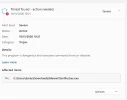
Process Injection
Injection procedures were detected at:
C:\windows\system32\dllhost.exe
PowerShell Execution
(Generic Payload Downloader)
• InjGen.exe
He launched it on my PC and it showed exactly this:
Reading virtual memory in 'javaw.exe' process with PID 13476
Validating detection...
[-] Injection detected in untested game client. Press any key to continue...
After further investigation, this detection doesn't prove anything. You can launch Minecraft through the Modrinth App yourself and run InjGen.exe. It will show the exact same warning, even without intentionally using cheats or injection tools.
This is the one he used:

 github.com
• VoidTools / Everything
He wrote down .jar and all he found was theseus.jar and all my other Modrinth mods that he reviewed after analysing my files on VoidTools. Other than that, he found no suspicious files/cheats.
• JournalTrace
He went on JournalTrace and searched for "jar". The only result he found was theseus.jar.
It stands for an internal Java archive (JAR) file generated or used by the Modrinth App. When you start a Minecraft instance, such as a Fabric modpack, through the Modrinth App, the launcher uses theseus.jar as part of its internal launching process.
• Jarabella Light
He also used Jarabella Light and went to the "Fabric" section after he sorted the size (Descending) and filtered it to "Show All".
After he did so, he only found my Modrinth mods and archived old mods. Then he changed the sort size to "Ascending" and found nothing but my mods.
Then he went to the section "Recents" and only found the "Antistutter" mod.
• Logitech G HUB
I use the Logitech G Pro X2 Superlight.
He opened the app and checked every assignment:
Commands
Keys
Actions
Macros
System
But he didn't find anything suspicious.
• MeowClientFucker
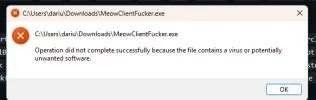
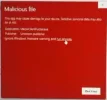
MeowClientFucker was also used during the screenshare and reported Kill Aura and Faster Sweeping Hit.
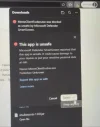
But Windows Defender had flagged the executable as a Severe Trojan, and it was still allowed to run during the screenshare.
I also find these results questionable because a lot of other tools were used to check my file history, like VoidTools/Everything, JournalTrace, etc. None of them found any traces of Kill Aura or Faster Sweeping Hit. MeowClientFucker was the only tool that reported these findings.
• BAMParser
He also downloaded and ran BAMParser to check my Windows execution history. No suspicious files or cheat related detections were found during that check.
• MeowResolver
Meow Resolver was also used to check my system for potential screenshare bypasses and restrictions.
The scan showed that all monitored Windows services were running and that no ConsoleHost history tampering, truncation, overwriting or deletion was detected.
The only four findings reported were system-time changes (Event ID 4616).
• System Informer
He opened System Informer and configured the memory string search on the Minecraft javaw.exe process.
The settings included:
Minimum string length: 10
Detect Unicode: Enabled
Extended Unicode: Enabled
Private memory: Enabled
Image memory: Enabled
Mapped memory: Enabled
This was used to inspect the Minecraft process for readable strings in its memory.
• MeowImporterChecker
He intially attempted to inspect the Minecraft process strings through System Informer using MeowImporterChecker, but the check failed because he didn't know how to use the tool.
He copied the Java installation path from my Modrinth settings and put it into the checker instead. It flagged it with "CPS", but I tested the same thing with a fresh Modrinth instance and someone else's Modrinth and got the exact same result, so this doesn't prove anything.
Final Statement:
I have provided the findings from the tools used during my screenshare, along with explanations for the detections that appeared.
I fully cooperated throughout the entire 1 hour and 33 minute screenshare and allowed the inspection of my PC. I would appreciate it if the footage and the findings from each tool could be reviewed individually and considered in their proper context.
I am not asking for special treatment. I am simply asking for a fair review of the evidence and an explanation of what specifically led to my ban.
Thank you for taking the time to read my appeal.
Ban Date: 08-11-2026
Reason: Bypassing/Hacking
I am rayytg, and I got banned on 08-11-2026 for "bypassing/hacking". I am writing this appeal because I know I wasn't cheating, and I believe my ban was unjustified.
What happened?
I was wagering in a duel against a player named shamwr After a few rounds, I got frozen by Guardian ChickPro He asked me to give him my AnyDesk details so he could screenshare me, and I fully cooperated with him.
After 1 hour and 34 minutes of screensharing, I got banned without any explanation of what I had supposedly done wrong. The only thing he said was "Let's wrap this up", and a bit after that, I was banned.
Below, I will go into detail about the tools ChickPro used during the screenshare, what each tool found, and my explanations for those findings. I will also include the full recording of him screensharing me.
Screenshare Findings
• Ocean
These two detections come from a game called Geometry Dash. I installed a mod called Geode, and Ocean detected it as a cheat even though it is a Geometry Dash modification.
Generic Massive Overlay
C:\Users\dariu\Downloads\geode-installer-v5.10.1-win.exe
Has a massive overlay (49074143 bytes).
Possible Windows API Injection
C:\Users\dariu\Downloads\geode-installer-v5.10.1-win.exe
These detections are additional findings There are customizable Spotify mods that provide access to features such as Spotify Premium, themes, and so on.
Process Injection
Injection procedures were detected at:
C:\windows\system32\dllhost.exe
PowerShell Execution
(Generic Payload Downloader)
• InjGen.exe
He launched it on my PC and it showed exactly this:
Reading virtual memory in 'javaw.exe' process with PID 13476
Validating detection...
[-] Injection detected in untested game client. Press any key to continue...
After further investigation, this detection doesn't prove anything. You can launch Minecraft through the Modrinth App yourself and run InjGen.exe. It will show the exact same warning, even without intentionally using cheats or injection tools.
This is the one he used:
Release v2.0 · NotRequiem/InjGen
Detector of out of instance JNI/JVMTI memory injections in a JVM client - Release v2.0 · NotRequiem/InjGen
github.com
• VoidTools / Everything
He wrote down .jar and all he found was theseus.jar and all my other Modrinth mods that he reviewed after analysing my files on VoidTools. Other than that, he found no suspicious files/cheats.
• JournalTrace
He went on JournalTrace and searched for "jar". The only result he found was theseus.jar.
It stands for an internal Java archive (JAR) file generated or used by the Modrinth App. When you start a Minecraft instance, such as a Fabric modpack, through the Modrinth App, the launcher uses theseus.jar as part of its internal launching process.
• Jarabella Light
He also used Jarabella Light and went to the "Fabric" section after he sorted the size (Descending) and filtered it to "Show All".
After he did so, he only found my Modrinth mods and archived old mods. Then he changed the sort size to "Ascending" and found nothing but my mods.
Then he went to the section "Recents" and only found the "Antistutter" mod.
• Logitech G HUB
I use the Logitech G Pro X2 Superlight.
He opened the app and checked every assignment:
Commands
Keys
Actions
Macros
System
But he didn't find anything suspicious.
• MeowClientFucker
MeowClientFucker was also used during the screenshare and reported Kill Aura and Faster Sweeping Hit.
But Windows Defender had flagged the executable as a Severe Trojan, and it was still allowed to run during the screenshare.
I also find these results questionable because a lot of other tools were used to check my file history, like VoidTools/Everything, JournalTrace, etc. None of them found any traces of Kill Aura or Faster Sweeping Hit. MeowClientFucker was the only tool that reported these findings.
• BAMParser
He also downloaded and ran BAMParser to check my Windows execution history. No suspicious files or cheat related detections were found during that check.
• MeowResolver
Meow Resolver was also used to check my system for potential screenshare bypasses and restrictions.
The scan showed that all monitored Windows services were running and that no ConsoleHost history tampering, truncation, overwriting or deletion was detected.
The only four findings reported were system-time changes (Event ID 4616).
• System Informer
He opened System Informer and configured the memory string search on the Minecraft javaw.exe process.
The settings included:
Minimum string length: 10
Detect Unicode: Enabled
Extended Unicode: Enabled
Private memory: Enabled
Image memory: Enabled
Mapped memory: Enabled
This was used to inspect the Minecraft process for readable strings in its memory.
• MeowImporterChecker
He intially attempted to inspect the Minecraft process strings through System Informer using MeowImporterChecker, but the check failed because he didn't know how to use the tool.
He copied the Java installation path from my Modrinth settings and put it into the checker instead. It flagged it with "CPS", but I tested the same thing with a fresh Modrinth instance and someone else's Modrinth and got the exact same result, so this doesn't prove anything.
Final Statement:
I have provided the findings from the tools used during my screenshare, along with explanations for the detections that appeared.
I fully cooperated throughout the entire 1 hour and 33 minute screenshare and allowed the inspection of my PC. I would appreciate it if the footage and the findings from each tool could be reviewed individually and considered in their proper context.
I am not asking for special treatment. I am simply asking for a fair review of the evidence and an explanation of what specifically led to my ban.
Thank you for taking the time to read my appeal.